
Your new customers sign up excited about what your product can do for them. Then they log in, can’t figure out where to start, and never come back. Maybe your product feels too complicated, or they don’t see results fast enough. Without a clear path from signup to their first win, you’re losing 40 to 60 percent of customers in the first 90 days. That’s not a product problem. That’s an onboarding problem, and it’s costing you revenue every single month.
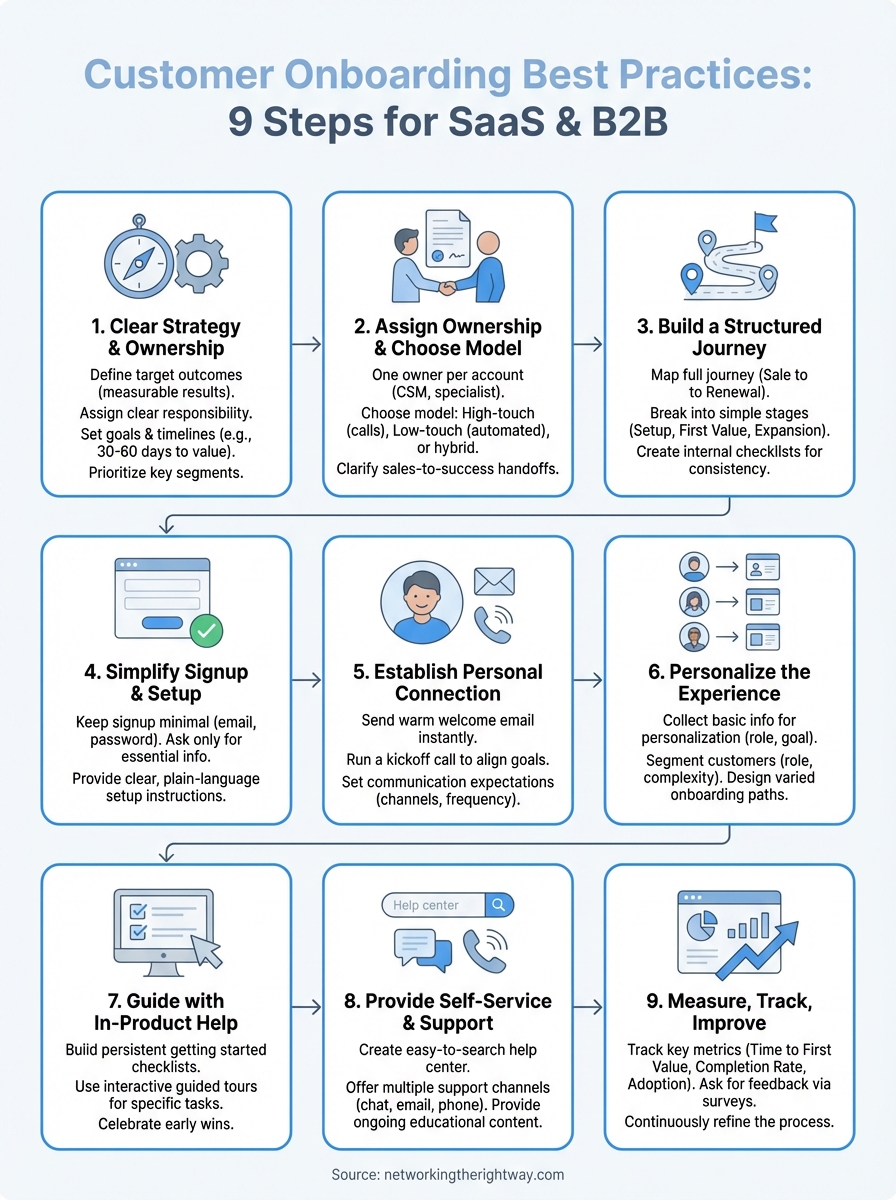
This guide walks you through customer onboarding best practices that actually work for SaaS and B2B companies. You’ll learn nine practical steps to design an onboarding process that reduces churn, boosts activation, and turns confused new users into confident customers. Each step includes clear actions you can implement right away, from simplifying your signup flow to tracking the metrics that matter. By the end, you’ll have a complete blueprint for getting customers to value faster and keeping them longer.
1. Start with clear strategy and ownership
You can’t improve an onboarding process without knowing what success looks like. Before you build a single workflow or send a welcome email, you need to define your target outcomes and assign clear responsibility for making them happen. Too many companies skip this step and wonder why their onboarding feels scattered or ineffective. Start by answering three basic questions about what you’re trying to achieve, who you’re serving, and who owns the results.

Define what successful onboarding looks like
Successful onboarding means your customer achieves a specific measurable outcome that proves your product works for them. This isn’t about them clicking through a tutorial or completing a checklist. You need to identify the exact action or result that signals they’re getting value. For a project management tool, that might be inviting their team and completing their first project. For an email marketing platform, it could be sending their first campaign and seeing opens. Write down what that outcome looks like for your product and make sure everyone on your team knows it.
The clearer your definition of success, the easier it becomes to design every step that leads customers there.
Set clear goals and time frames
Attach a specific timeline to your success outcome so you can measure whether your onboarding is working. Most SaaS companies aim for customers to reach their first value moment within 30 to 60 days of signing up. Pick a realistic time frame based on your product complexity and track how many customers hit that milestone. You should also set goals for activation rate, time to first value, and completion of key setup steps. These become your benchmarks for improving the process.
Decide which customer segments you will serve first
Your customers have different needs based on their role, company size, and use case. Building separate onboarding paths for every segment takes time, so prioritize the groups that represent your highest volume or highest value accounts. Start with one or two segments and perfect their experience before expanding. This focused approach lets you test what works and refine your customer onboarding best practices before rolling them out to everyone.
2. Assign ownership and choose your onboarding model
Customer onboarding best practices break down when nobody owns the outcome. You need one clear person responsible for each customer’s success from the moment they sign up until they reach their first value milestone. Without this ownership, accounts fall through the cracks, customers get confused by inconsistent information, and your team wastes time figuring out who should handle what. The structure you build around ownership determines whether your onboarding runs smoothly or creates chaos.
Assign one owner for each new account
Every new customer should know exactly who to contact when they have questions or need help moving forward. This owner could be a customer success manager, an onboarding specialist, or an account manager depending on your team structure. The key is that this person tracks progress, removes roadblocks, and drives the customer toward their first win. For high-touch accounts, assign this owner during the sales-to-success handoff. For lower-value accounts, you might assign owners to groups of customers instead of individuals.
One owner per account eliminates confusion and creates accountability for results.
Choose your onboarding model and level of touch
Your onboarding model determines how much human interaction each customer receives. High-touch onboarding includes scheduled calls, personalized training sessions, and dedicated support. Low-touch onboarding relies on automated emails, self-service resources, and in-product guidance. Most companies use a mix based on customer segment, with enterprise accounts getting high-touch and smaller accounts getting low-touch or tech-touch. Pick your model based on what your customers need and what your team can realistically deliver.
Clarify who handles sales to success handoffs
The handoff from sales to customer success is where critical context gets lost if you don’t have a clear process. Sales teams know the customer’s goals, pain points, and promised outcomes. Customer success needs this information to personalize onboarding and set accurate expectations. Create a simple handoff document or meeting where sales shares what matters most to each new account.
3. Build a structured onboarding journey with clear stages
Your onboarding process needs a clear roadmap that shows every step from the moment a customer signs up until they renew. Without this structure, your team makes decisions on the fly, customers get inconsistent experiences, and nobody knows what good onboarding actually looks like. Mapping your journey lets you identify gaps, remove bottlenecks, and create repeatable processes that work at scale. This is where customer onboarding best practices move from theory to implementation.
Map the journey from sale to first renewal
Start by listing every major milestone your customer needs to hit between signing the contract and their first renewal date. This includes account setup, initial configuration, first use of core features, team adoption, and reaching their success metric. Draw this out as a timeline that shows what should happen in week one, week two, and so on. Your map should also identify which teams are involved at each stage so everyone knows when they need to engage.
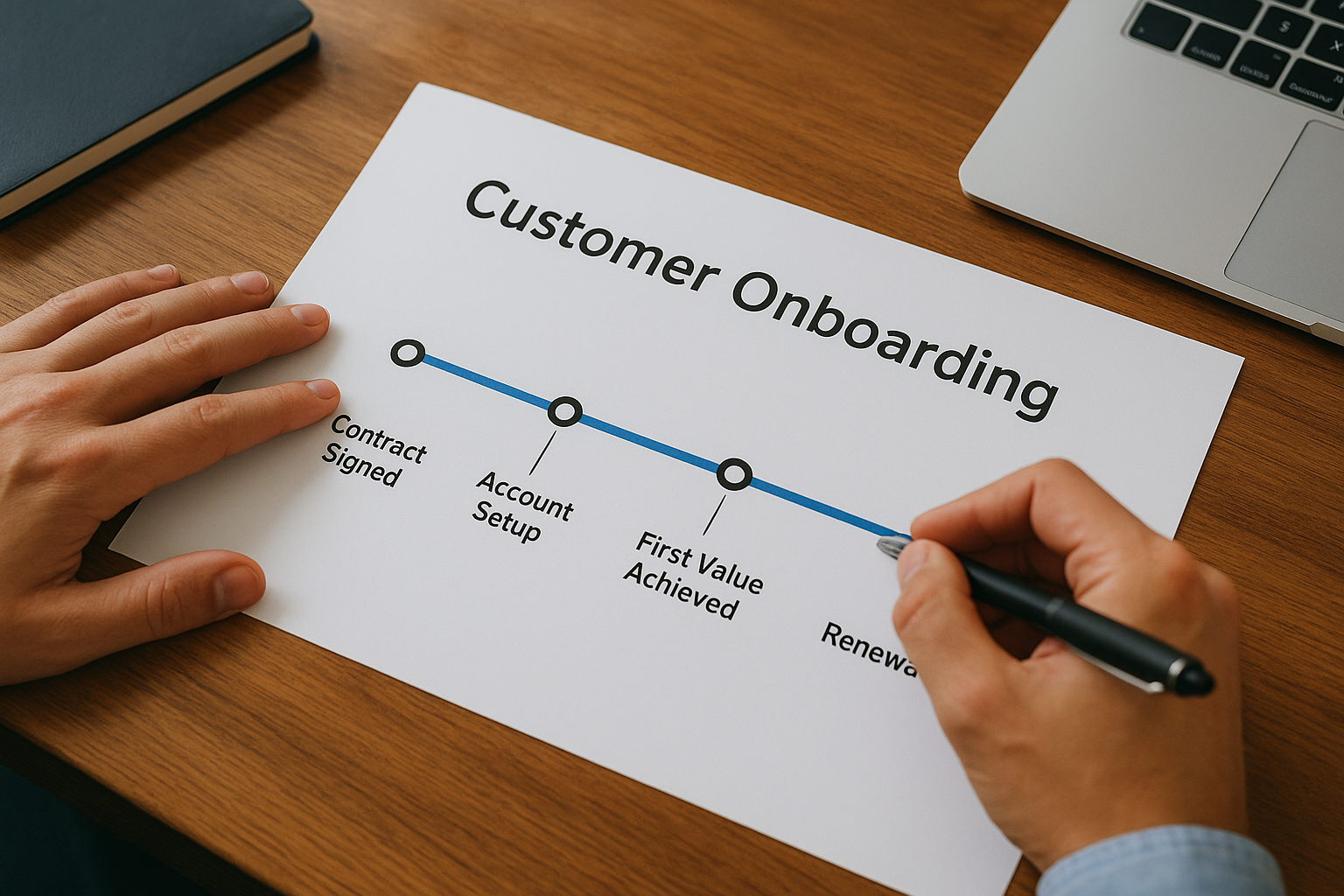
Mapping the full journey reveals the hidden gaps where customers typically get stuck or drop off.
Break onboarding into simple stages and tasks
Divide your onboarding journey into three to five clear stages that make sense for your product. Common stages include setup and configuration, training and education, first value achievement, and expansion. Under each stage, list the specific tasks customers must complete to move forward. Keep these tasks simple and actionable so customers always know what to do next.
Create internal checklists for each stage
Build checklists that tell your team exactly what they need to do at each stage of onboarding. These checklists should include tasks like sending welcome materials, scheduling kickoff calls, checking configuration progress, and following up on stalled accounts. Your checklists become your playbook for consistent execution across all customers.
4. Simplify signup and initial setup
The first interaction your customer has with your product sets the tone for everything that follows. If your signup flow asks for too much information or requires complicated configuration steps before they can see any value, you create friction that drives customers away before they even start. Research shows that 40 percent of people have returned products because they couldn’t figure out how to use them. Your job is to remove every unnecessary barrier between signup and their first meaningful action in your product.
Keep sign up and account creation simple
Your signup form should collect only the essential information you need to create an account and nothing more. An email address, password, and company name are usually enough to get started. You can gather additional details like team size, industry, or use case through a brief welcome survey after they log in rather than during signup. Consider offering single sign-on options through Google or Microsoft to reduce the steps even further and let customers use credentials they already have.
The faster someone gets inside your product, the faster they can start seeing value.
Ask only for information you truly need
Question every field in your signup and setup process by asking whether you absolutely need that information right now to deliver value. Many companies ask for phone numbers, job titles, and detailed company information during signup when they could collect it later through in-product prompts or during a kickoff call. Remove fields that serve your internal needs but don’t help the customer get started faster.
Provide clear setup instructions in plain language
Once someone creates an account, show them exactly what to do next using simple step-by-step instructions anyone can follow. Skip the technical terminology and industry jargon that confuses people who aren’t experts. Your instructions should tell them what action to take, why it matters, and how long it will take to complete.
5. Establish personal connection early
The first week after signup determines whether customers feel supported and valued or abandoned and confused. You need to reach out quickly with clear communication that builds trust and shows them they made the right decision. Customers who connect with a real person early in their journey are far more likely to complete onboarding and stick around long term. This personal touch separates companies that retain customers from those that watch them disappear without understanding why.
Send a warm welcome email with next steps
Your welcome email should arrive within minutes of signup and come from a real person on your team, not a generic company address. The email needs to thank them for choosing your product, introduce their main point of contact, and outline the exact next steps they should take in the first few days. Include links to key resources like your getting started guide, but keep the message focused on one clear action they can complete right away.
Run a kickoff call to align goals and roles
Schedule a kickoff call within the first week to discuss what success looks like for their specific situation. Use this call to understand their goals, identify who will use the product on their team, and explain how your onboarding process works. This conversation lets you personalize the rest of their journey and catch potential roadblocks before they become problems.
Building a personal relationship early creates trust that carries customers through challenging moments later.
Set expectations for communication and meetings
Tell customers exactly when and how often they’ll hear from you during onboarding. Let them know whether you’ll connect through email, scheduled calls, or chat, and how quickly they can expect responses to questions. Clear expectations prevent frustration and help customers feel confident they won’t get stuck without support.
6. Personalize the experience for different customer types
Generic onboarding treats all customers the same and delivers mediocre results for everyone. Your customers have different goals based on their role, company size, and what they want to accomplish with your product. When you personalize their journey by showing them only the features and workflows that matter to their specific situation, they reach value faster and feel like your product was built specifically for them. This is one of the most impactful customer onboarding best practices you can implement.
Collect basic info to personalize the experience
Ask customers three to five simple questions during or right after signup to understand their role, primary goal, and team size. This information lets you tailor everything that follows without requiring lengthy forms that create friction. You can use a welcome survey that appears on their first login or send these questions through email if you kept signup minimal. The key is collecting just enough data to route them to the right experience without overwhelming them with requests.
The better you understand each customer’s context, the more relevant and valuable every interaction becomes.
Segment customers by role goals and complexity
Group customers into clear segments based on the information you collected during signup. Common segments include role-based groups like marketing managers versus individual contributors, goal-based groups like those focused on reporting versus automation, and complexity-based groups like enterprise accounts versus small teams. You don’t need dozens of segments to see results. Start with two or three well-defined groups that represent your most common customer types.
Design different onboarding paths for each segment
Build separate onboarding sequences that speak directly to each segment’s needs and show them the specific features they care about first. Marketing managers might see workflows for campaign reporting while individual contributors see task management features. Each path should guide customers toward completing the actions most relevant to their goals rather than forcing everyone through identical steps.
7. Guide customers to their first win with in-product help
Customers learn fastest when you teach them inside your actual product rather than sending them to external documentation or lengthy video tutorials. In-product guidance shows users exactly what to do at the moment they need to do it, which reduces confusion and accelerates their path to value. Research shows that customers who complete interactive walkthroughs are significantly more likely to reach activation than those who rely only on help articles or trial-and-error exploration. Your goal is to guide them through essential actions step by step until they achieve their first meaningful result with your product.
Build a getting started checklist inside the product
Place a persistent checklist widget in your product interface that shows new customers the three to five critical tasks they need to complete during their first week. Each item on the checklist should link directly to the feature or page where they take that action, eliminating the need to search through menus. Display a progress bar that fills as they complete tasks so they can see how close they are to finishing setup.
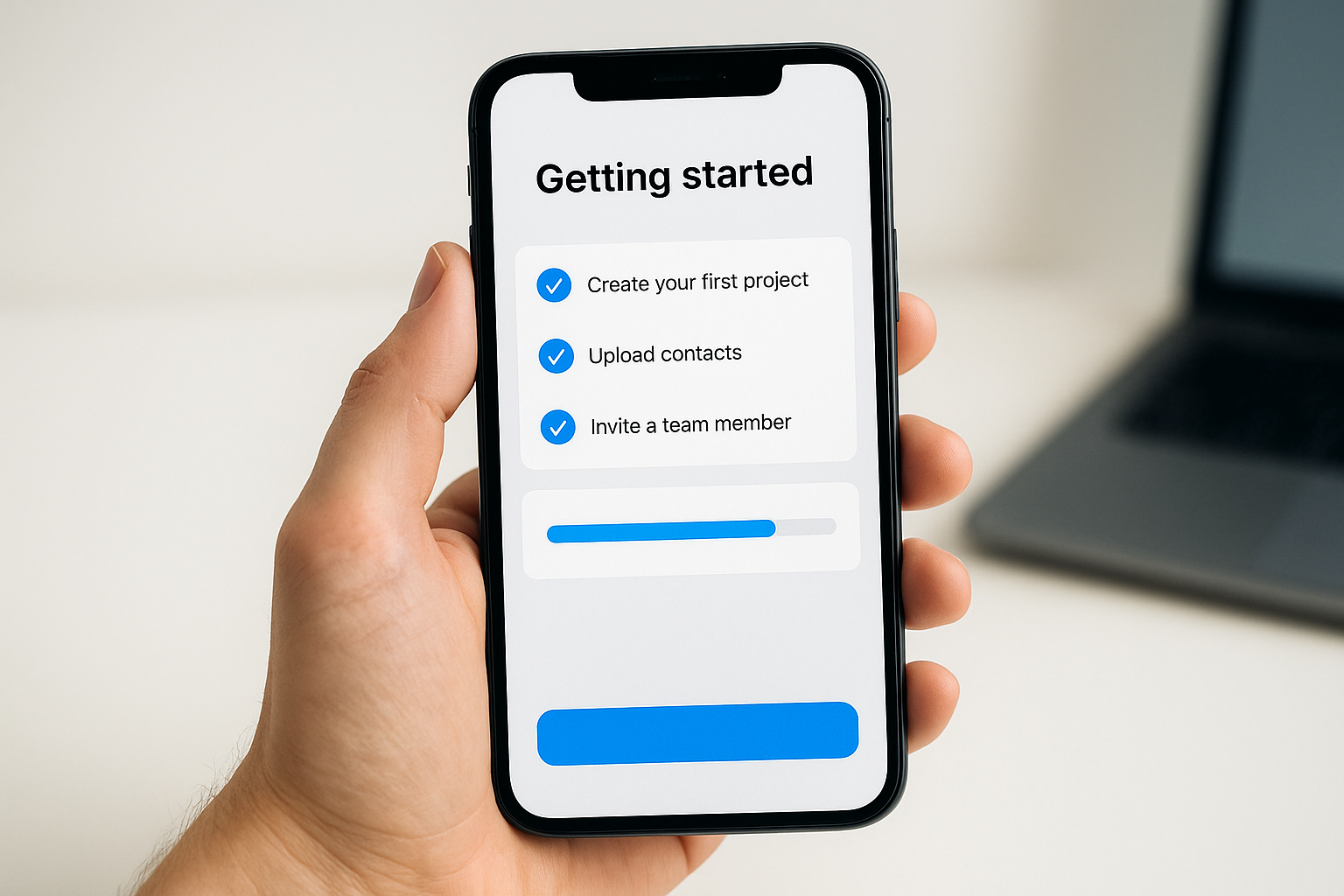
A visible checklist turns abstract onboarding into concrete steps customers can complete one at a time.
Use guided tours to show one task at a time
Create short interactive tours that highlight specific elements on the screen and explain what each button or field does using plain language. Focus each tour on completing one single task like creating their first project or importing contacts rather than trying to explain your entire product at once. Let customers skip tours if they already understand the feature, and make it easy to replay them later if needed.
Celebrate early wins to build confidence
Trigger a congratulatory message or animation when customers complete important milestones like finishing their profile, inviting their first team member, or accomplishing their core activation task. These celebrations reinforce that they’re making progress and build momentum toward bigger achievements. Include a clear next step in your celebration message so customers know exactly where to focus their attention after each win.
8. Provide self-service resources and ongoing support
Customers need help at different times throughout onboarding, and they want answers without waiting for a support ticket response or scheduling a call. Building robust self-service resources alongside multiple support channels gives customers the flexibility to get help in whatever way works best for their situation. Research shows that customers actually prefer solving simple problems on their own rather than contacting support. Your job is to make self-service resources so good that customers can find answers immediately while keeping human support available when they need it.
Create an easy to search help center
Your help center should organize documentation into clear categories that match how customers think about your product rather than how your team structures it internally. Include a prominent search bar that delivers accurate results using plain language customers would actually type. Write articles that answer one specific question each, and include screenshots or short videos that show exactly what to do. Keep articles short and scannable with clear headings so customers can find their answer in under 30 seconds.
Offer chat email and call options for support
Different customers prefer different support channels, so offer at least three ways to reach your team during onboarding. Chat works well for quick questions that need fast answers. Email gives customers a way to explain complex issues with screenshots and lets them respond when convenient. Phone support builds trust for enterprise customers who prefer talking through challenges with a real person.
Multiple support channels let customers choose how they want to get help rather than forcing them into one method.
Provide ongoing education through short lessons
Send customers brief educational content throughout their first 90 days that teaches them one new feature or workflow at a time. These lessons could be short videos under two minutes, email tips with screenshots, or in-app messages that appear when they’re ready to learn something new. Focus each lesson on helping them accomplish a specific task rather than overwhelming them with information they don’t need yet.
9. Measure track and continuously improve your process
You can’t improve what you don’t measure, and onboarding is no exception. Tracking the right metrics shows you which parts of your process work well and which parts lose customers before they reach value. The best customer onboarding best practices include a feedback loop where you collect data, analyze patterns, and make changes based on what you learn. Companies that systematically measure and optimize their onboarding see dramatic improvements in activation rates and customer retention over time compared to those that build their process once and never revisit it.
Track key onboarding metrics and health scores
Monitor specific quantitative metrics that tell you whether customers are progressing through onboarding successfully. Track time to first value, which measures how many days pass between signup and completing their core activation task. Watch your onboarding completion rate to see what percentage of customers finish all critical setup steps. Measure feature adoption rates during the first 30 days to understand which capabilities customers actually use. You should also create a health score that combines multiple signals like login frequency, task completion, and engagement with support resources.

Tracking the right metrics turns gut feelings about onboarding into concrete data you can act on.
Ask for feedback during and after onboarding
Send short surveys at strategic moments throughout the onboarding journey to understand how customers feel about their experience. Ask what’s working well and what’s confusing them while they’re still in the process rather than waiting until they finish or churn. Include a final onboarding survey around day 30 that asks customers to rate their experience and identify any gaps in support or guidance they received.
Improve your playbook based on what you learn
Review your metrics and feedback every month to identify patterns that indicate problems or opportunities. If customers consistently get stuck at a particular stage, that signals a need to add more guidance or simplify that step. When survey responses mention confusion about a specific feature, create better documentation or add an interactive walkthrough. Update your internal checklists and onboarding materials based on these insights so each new customer benefits from what you learned from previous ones.
Final thoughts
These nine customer onboarding best practices give you a complete framework for turning new signups into successful long-term customers. You don’t need to implement everything at once. Start with one or two steps that address your biggest pain points, whether that’s reducing early churn, improving activation rates, or scaling your support team. Track your results for 30 days, make adjustments based on what you learn, and gradually add more elements as your process matures. The companies that consistently onboard customers well didn’t build perfect systems overnight. They improved incrementally by measuring what works and fixing what doesn’t.
Building an effective onboarding process requires the same strategic thinking and consistent effort you need for any successful online business. If you’re looking for a simple way to build a business online that teaches you proven methods step by step, check out this straightforward approach designed specifically for people just getting started.